
A consumable in-app purchase is spent and gone — coins, render credits, extra lives. A non-consumable is a permanent unlock that follows the user forever — a pro theme, an ad removal, a lifetime feature gate. If your SKU gets used up and the user might want more, it's consumable. If buying it once should be enough forever, it's non-consumable. Both product types are defined in App Store Connect and Google Play Billing, and tools like APPRICER can show you which model drives the most revenue in your category before you commit to either.
Key Takeaways
The single most important rule: classify your SKU before you write a line of purchase code, because changing a product type after launch means creating a new SKU and migrating existing buyers.
| Point | Details |
|---|---|
| Consumable = spent, non-consumable = permanent | Consumables deplete and can be repurchased; non-consumables are owned forever after one buy. |
| Non-consumables must be restorable on iOS | App Store Review requires a Restore Purchases flow; missing it causes rejection. |
| Android type is set by your API call | consumeAsync() makes a product re-buyable; acknowledgePurchase() keeps it permanently owned. |
| Acknowledge within three days on Android | Google may auto-refund purchases not consumed or acknowledged within the three-day window. |
| Misclassification has real costs | Wrong product type causes restore failures, duplicate purchases, refund requests, and analytics gaps. |
Table of Contents
- What's the real difference between consumable and non-consumable items?
- How Apple and Google Play handle each purchase type
- Your implementation checklist for both product types
- When should you pick consumable vs non-consumable?
- Sandbox testing: what catches teams off guard
- What APPRICER data shows about consumable vs non-consumable revenue patterns
- The part most teams get wrong
- Sources
What's the real difference between consumable and non-consumable items?
Consumables are goods designed to be used up — a concept that maps cleanly from physical products (batteries, ink cartridges) to digital ones (coin packs, API call credits). Non-consumables are the opposite: one purchase, permanent access, no expiration.
In app terms:
Consumable examples:
- Game coins, gems, or gold
- Extra lives or continues
- AI prompt credits or render tokens
- Boosts, power-ups, or temporary buffs
- Cloud storage add-ons sold per GB
Non-consumable examples:
- Remove-ads unlock
- Permanent level or chapter unlock
- Pro theme or UI skin
- One-time feature upgrade (e.g., offline mode)
- Lifetime access to a tool's premium tier
| Dimension | Consumable | Non-consumable |
|---|---|---|
| Lifecycle | Used up; balance depletes | Permanent; never expires |
| Restorability | Cannot be restored | Must be restorable (platform requirement) |
| Re-purchasable | Yes, repeatedly | No (same SKU cannot be re-bought) |
| Platform handling | App calls consume/acknowledge | App acknowledges; platform tracks ownership |
| Common categories | Games, AI tools, media | Utilities, productivity, games (one-time unlocks) |
Subscriptions sit in a third category entirely. They have a managed lifecycle with renewal and cancellation events that the platform handles automatically — something neither consumables nor non-consumables get.
How Apple and Google Play handle each purchase type
Apple (App Store Connect)
Apple exposes both product types directly in App Store Connect. The critical rule: non-consumable purchases must be restorable via a Restore Purchases flow. App Store Review Guideline 3.1.1 enforces this, and missing it is a common rejection reason. Consumables carry no restore obligation — Apple's position is that the user spent them.
On the StoreKit side, the key calls are:
SKPaymentQueue.finishTransaction()— call this after granting any purchase to remove it from the queueSKPaymentQueue.restoreCompletedTransactions()— required for non-consumables so users can reclaim after reinstall
Google Play (Google Play Billing)
Google's model is more explicit about the consumable/non-consumable split at the code level. Calling consumeAsync() (or consumePurchase()) makes a one-time product re-purchasable by removing it from the user's purchase history. Calling acknowledgePurchase() instead keeps it permanently owned. The platform doesn't decide which path to take — your app code does.
The hard deadline: every purchase must be consumed or acknowledged within three days, or Google may automatically refund it.
RevenueCat notes that SDKs like theirs abstract some of this, but developers still need to configure which products should trigger consumePurchase() versus acknowledgment. Getting that configuration wrong means users can't repurchase consumables — or worse, can repurchase non-consumables they already own.
Your implementation checklist for both product types
Follow this sequence for every IAP you ship, regardless of type.
-
Define the SKU in the platform console. In App Store Connect, set the product type explicitly (consumable or non-consumable). In Google Play, create a one-time product; the type is determined by your API call, not the console.
-
Verify the receipt or purchase token server-side before granting anything. Never trust the client alone. Send the receipt (iOS) or purchase token (Android) to your backend and validate against Apple's or Google's verification endpoints.
-
Grant the entitlement. Credit the balance (consumable) or flip the feature flag (non-consumable) in your database only after server-side validation succeeds.
-
Call the correct platform API immediately after granting.
- iOS:
finishTransaction()for both types - Android consumable:
consumeAsync()to allow repurchase - Android non-consumable:
acknowledgePurchase()to confirm ownership
- iOS:
-
Persist state on your backend. For consumables, store the current balance. For non-consumables, store the entitlement flag tied to the user account, not the device.
-
Implement Restore Purchases for non-consumables. On iOS this is mandatory. On Android, query
queryPurchasesAsync()on app launch to restore owned non-consumables. -
Handle refunds and revocations. Apple sends
REFUNDnotifications via App Store Server Notifications. Google sendsvoided purchases. Your backend must deduct balances or revoke entitlements when these arrive. -
Hook analytics at the grant step. Log purchase type, SKU, user ID, and timestamp. This is the data you'll need to diagnose conversion and churn later.
Pro Tip: Build idempotency into your grant logic. If a user's device sends the same purchase token twice (network retry, duplicate callback), your server should detect it and skip the second grant rather than doubling a coin balance.
Apphud's documentation makes an important point: consumable purchases cannot be restored, and some SDKs auto-call consume or acknowledge based on configuration. Audit your SDK settings before launch — a misconfigured SDK can silently consume a non-consumable or fail to consume a consumable.
When should you pick consumable vs non-consumable?
The decision comes down to two questions: Does the value repeat? And does your revenue model depend on predictability?
Choose consumable when:
- The feature or content is inherently finite (credits, lives, tokens)
- High-engagement users will spend significantly more than casual ones
- You want to capture variable spend from power users
- Your app's core loop drives repeat purchase naturally
Choose non-consumable when:
- The value is permanent and binary (either the user has it or they don't)
- You want a low-friction, one-time conversion (remove ads, unlock pro)
- You're targeting users who resist subscriptions but will pay once
Hybrid models often outperform either alone. A non-consumable base unlock (removes ads, opens core features) paired with consumable credits for premium actions captures both user types. Similarly, a subscription tier with consumable credit top-ups lets heavy users spend beyond the plan ceiling without forcing everyone onto a higher tier.
Pricing traps to avoid: lifetime non-consumable prices that undercut your annual subscription make the subscription look like a bad deal. On the consumable side, confusing pack sizes (why does the 500-coin pack cost more per coin than the 100-coin pack?) erode trust and suppress conversion.
Consumable revenue is also harder to forecast. Spend is tied to engagement, so a drop in daily active users hits consumable revenue faster than subscription revenue. That's not a reason to avoid consumables — it's a reason to instrument them carefully.
Sandbox testing: what catches teams off guard
Most IAP bugs surface in testing, not production. The sandbox environment behaves differently from live in ways that matter.
QA checklist:
- Purchase → verify server receipt → grant → consume/acknowledge → confirm balance or entitlement
- Reinstall the app → trigger Restore Purchases → confirm non-consumable is restored, consumable balance is not
- Simulate a refund → confirm backend revokes the entitlement or deducts the balance
- Test with a fresh sandbox account that has no prior purchase history
- Test the same consumable SKU twice in a row to confirm re-purchase works after
consumeAsync()
Common gotchas:
On Android, the three-day acknowledgement window applies in production. In sandbox, Google may refund unacknowledged purchases faster. Always acknowledge or consume in the same session as the grant during testing so you catch any missing API calls before they cost a real user their purchase.
On iOS sandbox, restoreCompletedTransactions() only returns purchases made with the same sandbox Apple ID. Teams often test restore with a different account and conclude it's broken when it's working correctly.
Propagation delay is real on both platforms. After creating a new SKU in the console, wait up to a few hours before expecting it to appear in sandbox. Testing immediately after creation often returns "product not found" errors that disappear on their own.
What APPRICER data shows about consumable vs non-consumable revenue patterns
Across the iOS app categories tracked by APPRICER, casual games and entertainment apps lean heavily on consumables — coin packs, lives, and boosts drive the bulk of their IAP revenue. Utility and productivity apps, by contrast, tend to generate most of their one-time purchase revenue from non-consumables: pro unlocks, lifetime access, and feature gates.

The more interesting signal is in hybrid models. Apps that pair a non-consumable base unlock with consumable top-ups tend to show stronger average revenue per user than apps relying on either model alone. The non-consumable converts the user out of the free tier; the consumable captures incremental spend from the most engaged segment.
| App category | Dominant IAP model | Revenue driver |
|---|---|---|
| Casual / puzzle games | Consumable | Coin and life packs, boosts |
| AI tools / productivity | Consumable + subscription | Credit packs above plan limits |
| Utility apps | Non-consumable | Lifetime or pro unlocks |
| Photo / creative tools | Mixed | One-time pro + consumable exports |
You can validate these patterns for any specific niche using APPRICER's searchable database of iOS app prices and products, which shows revenue distribution by product type across 175 countries.
The part most teams get wrong
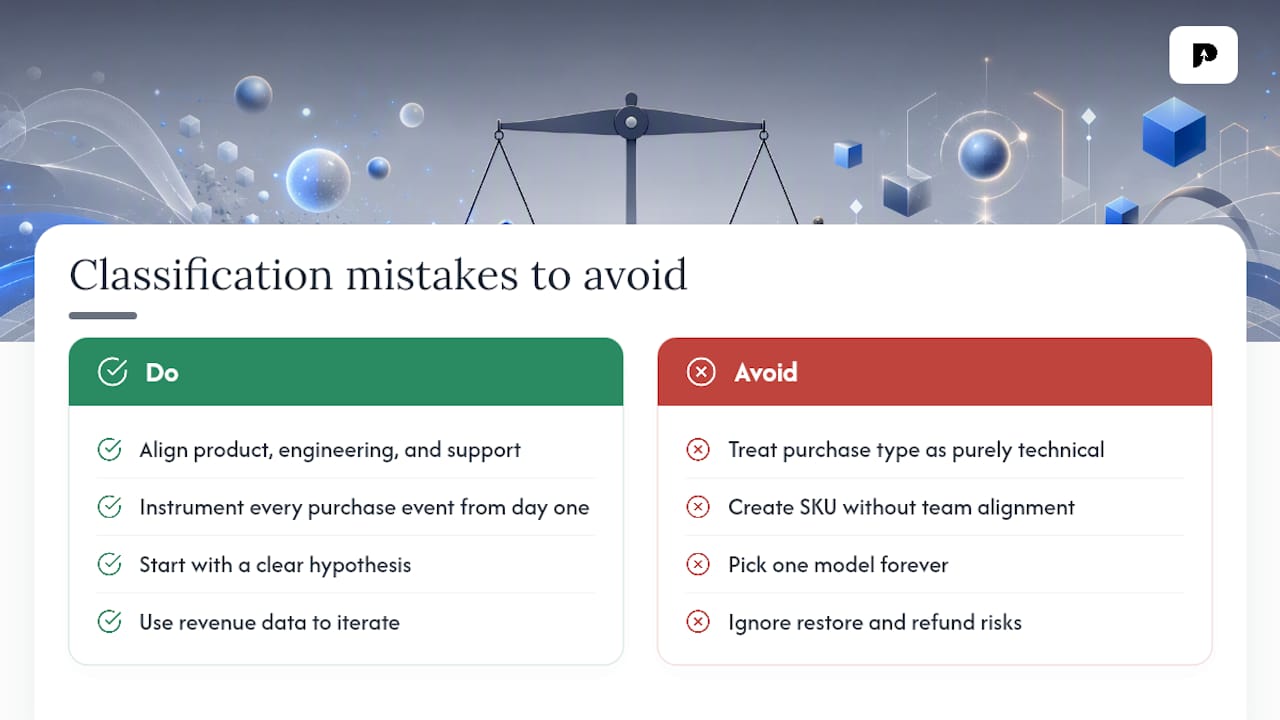
The classification decision looks simple until you're three sprints into development and realize you've built a consumable flow for something that should have been a non-consumable — or vice versa. Misclassification has real consequences: users who can't restore a purchase they paid for will leave a one-star review and request a refund. Users who can repurchase a non-consumable they already own will do exactly that, and you'll spend engineering time on refund processing instead of features.
The subtler mistake is treating the consumable/non-consumable choice as purely technical. It's a product decision first. A "premium filter pack" sold as a consumable (one-time use per filter) and the same pack sold as a non-consumable (permanent access) are different products with different price points, different user expectations, and different support implications. Get alignment between product, engineering, and support before you create the SKU in the console — changing a product type after launch requires creating a new SKU and migrating existing purchasers.
On the monetization side, the teams that perform best don't pick one model and commit to it forever. They start with a clear hypothesis, instrument every purchase event from day one, and use real revenue data to iterate. APPRICER's category-level signals are useful here: knowing that your category's top apps generate a specific share of revenue from consumables versus non-consumables gives you a benchmark to test against, not just a pattern to copy.
Sources
- Create consumable or non-consumable In-App Purchases - Manage In-App Purchases - App Store Connect - Help - Apple Developer
- One-time products | Google Play Billing
- One Time Products | RevenueCat
- Consumable and Non-consumable Purchases
- Consumables